LeetCode 2194. Cells in a Range on an Excel Sheet
Question
A cell (r, c) of an excel sheet is represented as a string "
-
denotes the column number c of the cell. It is represented by alphabetical letters. For example, the 1st column is denoted by 'A', the 2nd by 'B', the 3rd by 'C', and so on. is the row number r of the cell. The rth row is represented by the integer r.
You are given a string s in the format "
Return the list of cells (x, y) such that r1 <= x <= r2 and c1 <= y <= c2. The cells should be represented as strings in the format mentioned above and be sorted in non-decreasing order first by columns and then by rows.
Example 1:
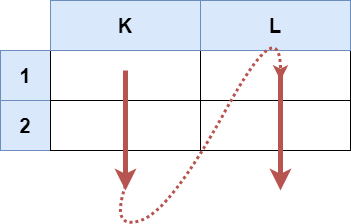
Input: s = "K1:L2"
Output: ["K1","K2","L1","L2"]
Explanation:
The above diagram shows the cells which should be present in the list.
The red arrows denote the order in which the cells should be presented.
Example 2:

Input: s = "A1:F1"
Output: ["A1","B1","C1","D1","E1","F1"]
Explanation:
The above diagram shows the cells which should be present in the list.
The red arrow denotes the order in which the cells should be presented.
Constraints:
- s.length == 5
- 'A' <= s[0] <= s[3] <= 'Z'
- '1' <= s[1] <= s[4] <= '9'
- s consists of uppercase English letters, digits and ':'.
Solution
Python
class Solution:
    def cellsInRange(self, s: str) -> List[str]:
        list_s = list(s)
        letters = []
        numbers = []
        new_s = []
        for i in range(ord(list_s[0]),ord(list_s[3])+1):
            letters.append(chr(i))
        for j in range(int(list_s[1]),int(list_s[-1])+1):
            numbers.append(str(j))
        for i in letters:
            for j in numbers:
                new_s.append(i+j)

        return new_s
Java